

Ordering supplies for your HandyTrac system is easy through our online catalog. Follow these simple steps to submit your order.
Log In and Select Supplies
Log in to the HandyTrac website and select Supplies. This will take you to the supply order page.
Confirm the Delivery Address
Before placing your order, confirm that the property’s delivery address is correct.
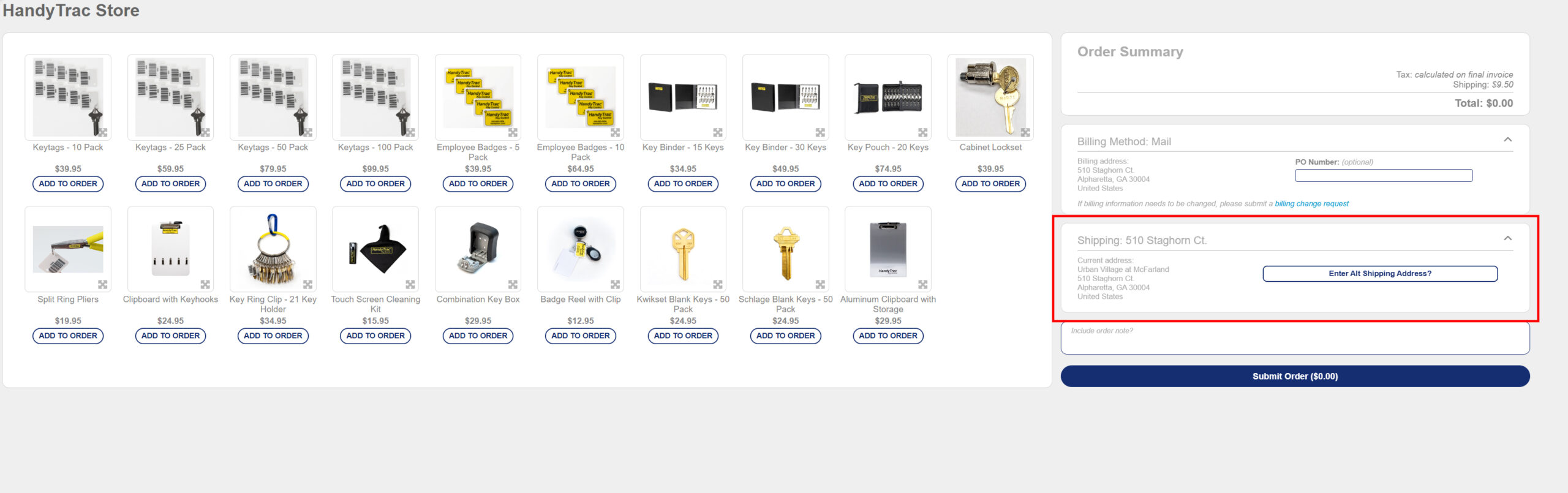
Browse the Online Catalog
Browse the available supplies and enter the quantity of each item you would like to order. You can also hover over an item to view a larger image.
Add an Optional Note
If you have any specific instructions for your order, add them in the optional notes section at the bottom of the page.
Submit Your Order
Once you have reviewed your selections, click Submit at the bottom of the page. Your order will then be sent to HandyTrac for fulfillment.
Watch the Video Tutorial
Prefer to see the process in action? Watch our step-by-step video tutorial below to learn how to order HandyTrac supplies online.

We’re Here to Help
If you need help placing your order or have questions about which supplies you need, contact HandyTrac Support. Our team will be happy to assist you.
We’re Here to Help
If you need help placing your order or have questions about which supplies you need, contact HandyTrac Support. Our team will be happy to assist you.