

Severe weather can interrupt power, internet access, and normal property operations, but your team may still need keys for maintenance requests, emergency response, or resident needs. Fortunately, your HandyTrac system includes several safeguards that can help you maintain controlled key access during a storm.
Reviewing your emergency procedures before bad weather arrives can help your team respond confidently while continuing to protect residents, staff, and property.
Using An Uninterruptible Power Supply (UPS)
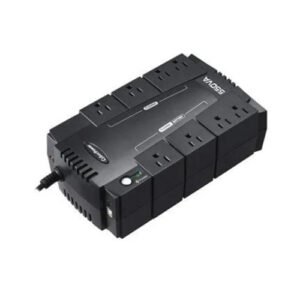
Your HandyTrac system should always be connected to a dedicated uninterruptible power supply (UPS). If your property briefly loses power, a UPS can provide temporary battery power that allows the system to continue operating.
Note: A 600 VA rated UPS battery backup can power a HandyTrac system for up to 2.5 hours, so use it sparingly and only as needed.
To help ensure the UPS works properly:
- Keep it connected only to the HandyTrac system.
- Confirm that it is powered on and connected correctly.
- Periodically inspect the power cord and other connections.
- Avoid plugging additional office equipment into the UPS.

Keep A Current Copy Of Your Key Map
HandyTrac’s random key rotation feature assigns returned keys to different available hooks. This helps prevent anyone from memorizing where a particular key is stored, but it also means previously printed key maps quickly become outdated.
To view, print, or download your current keymap, sign in to your HandyTrac online account. Select Auditing from the menu, then select your Keymap. Alternatively, you can sign in to the HandyTrac app with your email and password to access your keymap. You must have permissions to view the keymap on your account
Before storm season:
- Review which employees have permission to access the key map.
- Remove access for anyone who no longer requires it.
- Confirm that authorized managers can sign in to the HandyTrac website or app.
- Make sure authorized managers know where to locate the live key map.
- Review how key-map information must be protected during an emergency.
Manually Accessing Use Your HandyTrac System
Once your keys and up-to-date keymap are secured, the safest option for the hardware itself is to unplug it. A sudden spike in electrical voltage, often triggered by lightning or by the grid coming back online after an outage, can easily damage electronics that are plugged in.
While the HandyTrac warranty requires a UPS battery backup connection, no amount of circuit protection can stop a direct lightning strike. For this reason, it is best to unplug the battery backup completely from the wall.
To manually access your HandyTrac system:
- Manually unlock the cabinet using your cabinet backup key
- Consult the keymap to locate the hook your unit key is on.
- Remove the key and relock the cabinet.
- To return the key, unlock the cabinet, then place the key back on the same hook it was removed from
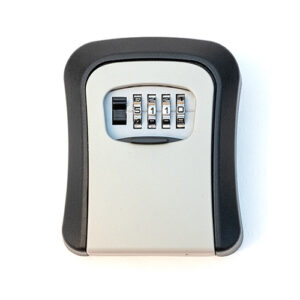 Never store the backup key inside the cabinet. If it cannot be located during an outage, the cabinet lock may need to be drilled out and replaced.
Pro tip: Our mountable lock box available on the HandyTrac online shop is an excellent solution for securely storing your backup key.
Moving Back To Standard Operations
Once it is safe and power is stable again, you can plug the system back in and bring it online. We recommend performing a key audit to make sure that all keys are accounted for and in their correct location.
Following the key audit, shred the physical keymap copy. Once the system is back to normal usage, a printed keymap is not only inaccurate, it is a security risk.
Prepare Your HandyTrac System Before a Storm
A few simple steps can make managing keys much easier when severe weather arrives:
- Confirm that your HandyTrac system is connected to a dedicated UPS.
- Check that the UPS is powered on and functioning properly.
- Evaluate whether you need to turn off the machine to protect it from lightning strikes
- Review who has permission to access the live key map.
- Confirm that authorized managers can access the HandyTrac website and app.
- Verify that the cabinet backup key is securely stored outside the cabinet.
- Review outage procedures with employees who may work during the storm.
- Establish a process for documenting manual key transactions.
- Make sure employees understand how printed key maps and temporary records must be protected and destroyed.
For additional instructions, review our complete Emergency Preparedness Guide with your authorized team members before severe weather arrives.
Stay Prepared When Severe Weather Strikes
Storms may disrupt normal operations, but they do not have to leave your team without controlled access to important keys. With UPS battery backup, permission-based access to the live key map, and a securely stored cabinet key, your HandyTrac system provides several ways to maintain key access during an emergency.
Preparation is essential. Confirm permissions, test your equipment, secure your backup key, and review emergency procedures before severe weather arrives.
If you have questions about preparing your system for severe weather or accessing it during an outage, contact our Technical Support team for assistance.